API Credentials
To interact with the Payin & Payout REST APIs, you will need an
Access Key and a Secret Key. These credentials are used to
authenticate and authorize every API request.
Follow the steps below to generate your API credentials from the
CRM Dashboard:
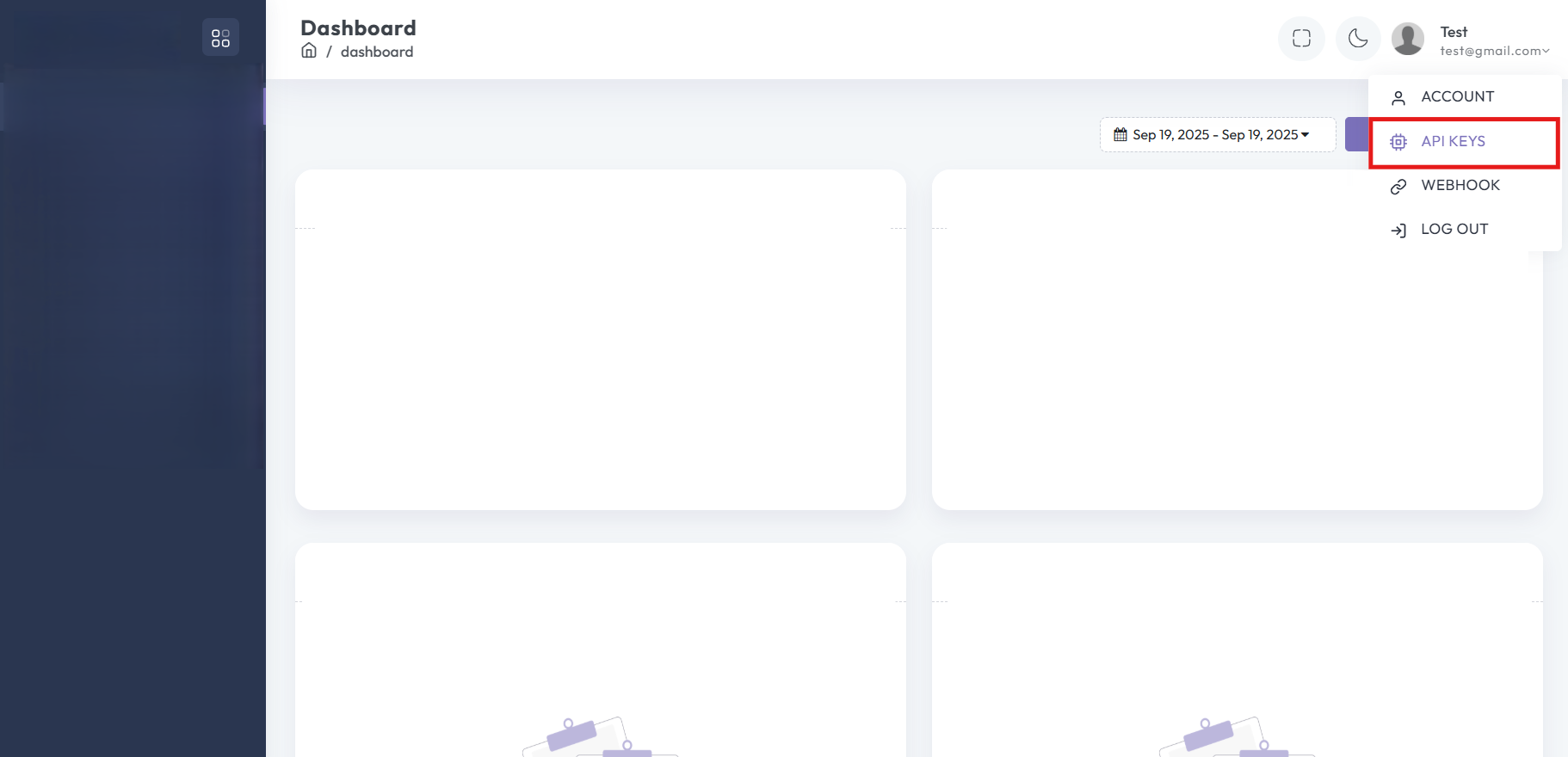
- Login to the CRM portal using your registered account.
- Navigate to
Profile → API Keys.
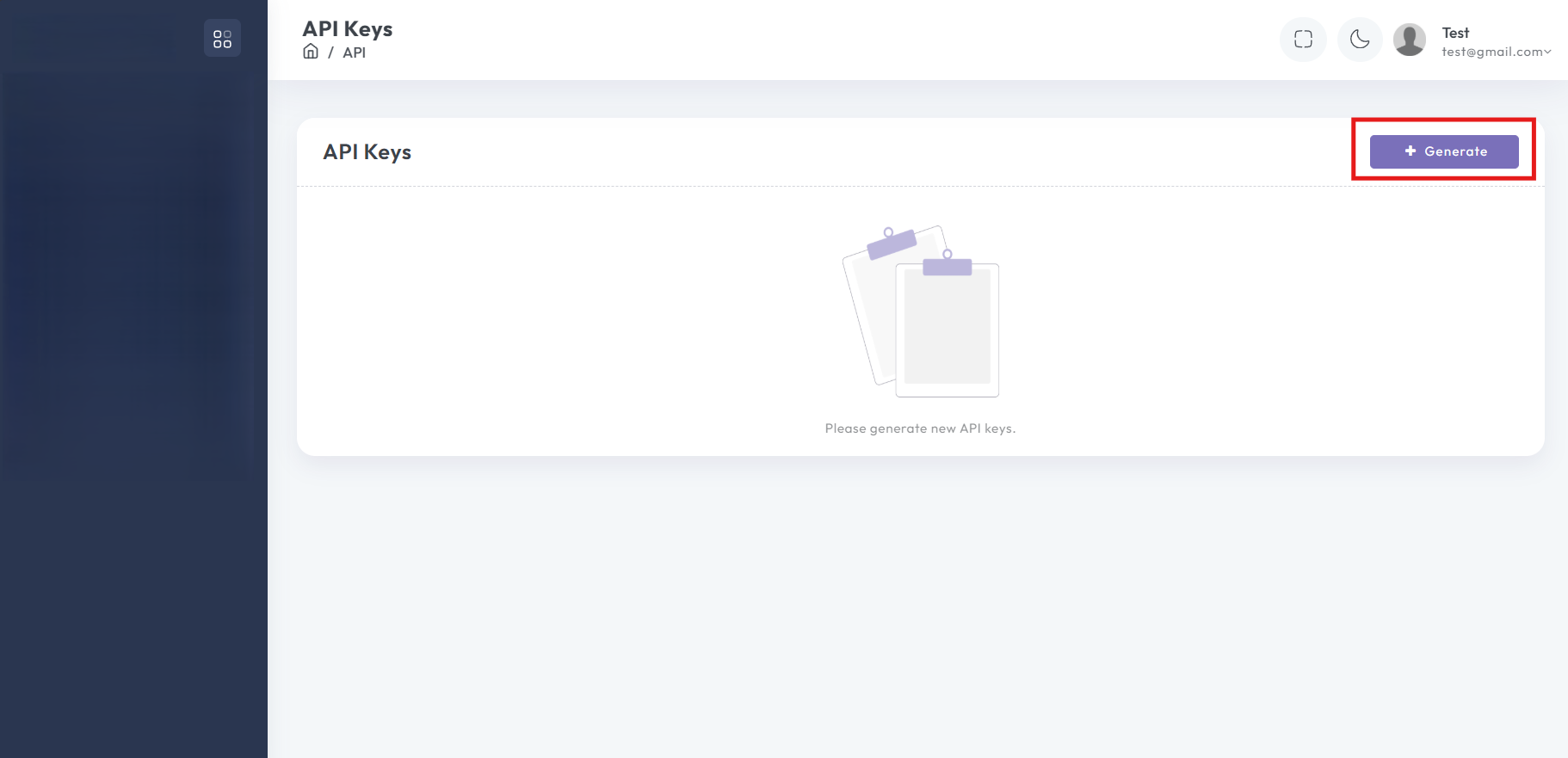
- Click on Generate API Key.
-
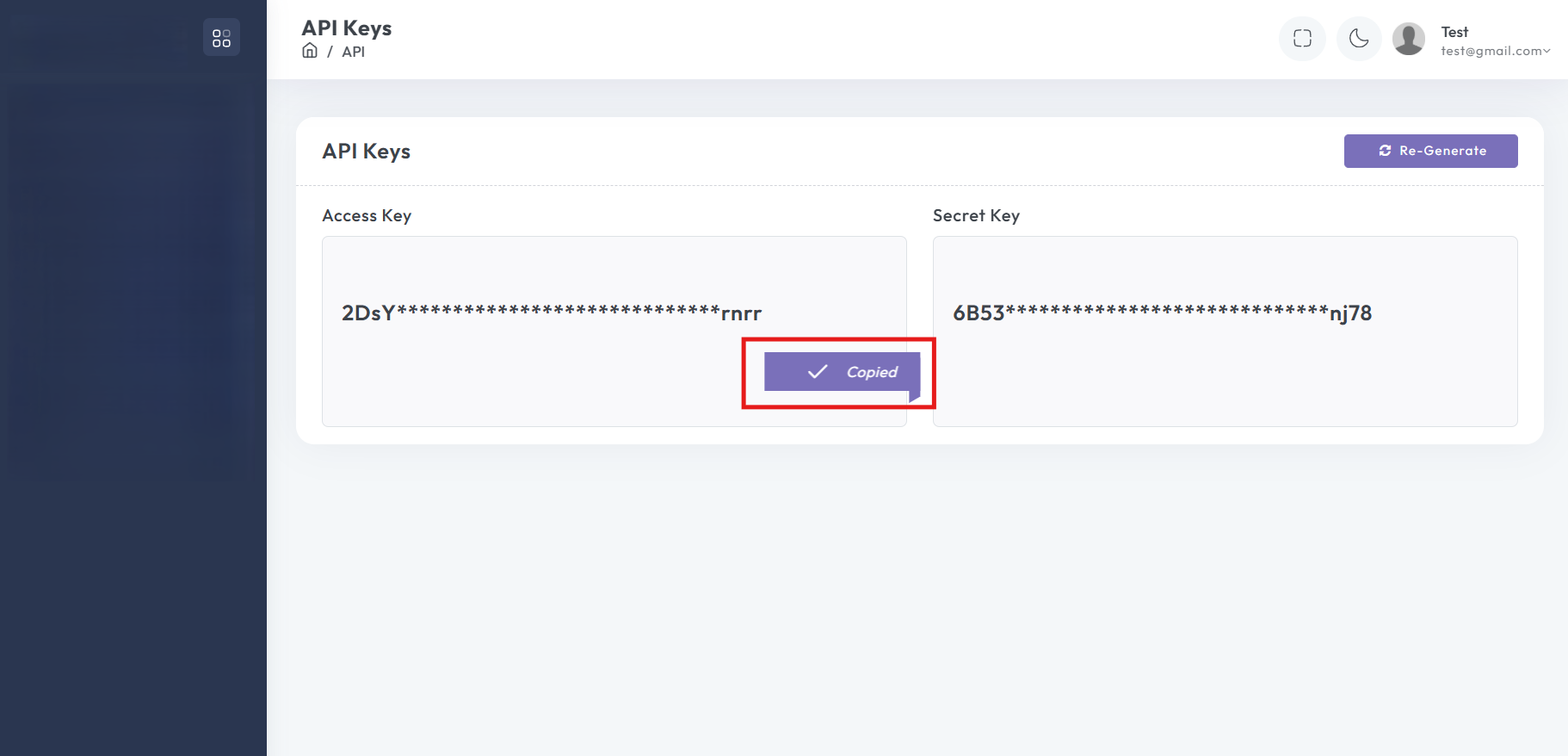
The system will provide you with an
Access Key and a Secret Key.
Timestamp
The current Unix timestamp (in milliseconds) when the request is
made. This prevents replay attacks — if the timestamp is too old
or invalid, the request will be rejected.
Each request needs to have a Timestamp header. This is required
to prevent a request replay attack. The value for this header is
the number of milliseconds since epoch.
We shared some code samples in common languages on how to
generate this value:
PHP:
$timestamp = floor(microtime(true) * 1000);
Python:
    import time
    timestamp = time.time_ns() // 1000000
Javascript:
const timestamp = Date.now();
Java:
long timestamp = System.currentTimeMillis();
Signature
In order to successfully send a request, each request must
contain a Signature key. The signature key is formed using a
combination of request parameters and Secret-Key.
The signature is generated by first serializing the request into
a stream of bytes. The stream has the following format:
REQUEST_METHOD
REQUEST_PATH
REQUEST_BODY
Timestamp
For example, for the request to create a payout request, the following
signature string will be generated:
REQUEST_METHOD EX: POST or GET
REQUEST_PATH EX: api/v1/payout/initiate or you will find in APIs doc.
Body should be in json format
REQUEST_BODY for POST EX:
{
    "beneficiary_name": "Test Name",
    "beneficiary_email": "test.test@gmail.com",
    "beneficiary_mobile_no": 7878787878,
    "beneficiary_address": "NOIDA",
    "payment_method": "IMPS",
    "beneficiary_acc_no": "99999999999",
    "bank_name": "SBI",
    "ifsc": "SBIN0060589",
    "amount": 5,
    "order_id": "6778MYP412",
    "remarks": null
}
REQUEST_BODY for GET EX:
{}
Timestamp EX: 1790431844701.
EMPTY BODY
=> For GET requests, the body line will be left empty. However, in case of any other method and empty body, the body line should be {}.
After generating the signature string, the string needs to be hashed in HMACSHA256 format using your Secret-Key. The generated bytes need to be converted into a hex string and need to be added to the request header in the Signature header.
We shared some code samples in common languages on how to generate Signature:
PHP:
function calculate_hmac($secret, $timestamp, $body, $path, $method = 'GET')
{
    $message =  $method . "\n" . $path . "\n" . $body . "\n" . $timestamp . "\n";
    return hash_hmac('sha256', $message, $secret);
}
Python:
import hmac
import hashlib
import json

def calculate_hmac(secret: str, timestamp: str, body: dict, path: str, method: str = 'GET') -> str:
    # Convert dict to JSON string (compact, no spaces, consistent)
    body_str = json.dumps(body, separators=(',', ':'))

    digest = hmac.new(secret.encode("utf-8"), digestmod=hashlib.sha256)

    # Build the message: method + "\n" + path + "\n" + body + "\n" + timestamp + "\n"
    digest.update(method.encode("utf-8"))
    digest.update(b"\n")
    digest.update(path.encode("utf-8"))
    digest.update(b"\n")
    digest.update(body_str.encode("utf-8"))
    digest.update(b"\n")
    digest.update(timestamp.encode("utf-8"))
    digest.update(b"\n")

    return digest.hexdigest()  # lowercase hex string
Javascript:
const crypto = require('crypto');

function calculate_hmac(secret, timestamp, body, path, method = 'GET') {
  const hmac = crypto.createHmac('sha256', secret);

  // Build the message like: method + "\n" + path + "\n" + body + "\n" + timestamp + "\n"
  hmac.update(method, 'utf8');
  hmac.update('\n', 'utf8');
  hmac.update(path, 'utf8');
  hmac.update('\n', 'utf8');
  hmac.update(body, 'utf8');
  hmac.update('\n', 'utf8');
  hmac.update(String(timestamp), 'utf8');
  hmac.update('\n', 'utf8');

  return hmac.digest('hex'); // lowercase hex string
}
Java:
import javax.crypto.Mac;
import javax.crypto.spec.SecretKeySpec;
import java.nio.charset.StandardCharsets;

public class HmacUtil {

    // Convert bytes to hex string
    private static String bytesToHex(byte[] bytes) {
        StringBuilder hex = new StringBuilder();
        for (byte b : bytes) {
            hex.append(String.format("%02x", b));
        }
        return hex.toString();
    }

    // Calculate HMAC SHA256 signature
    private static String calculateHMAC(String timestamp, String secretKey, String path, String body, String method) {
        try {
            SecretKeySpec secretKeySpec = new SecretKeySpec(secretKey.getBytes(StandardCharsets.UTF_8), "HmacSHA256");
            Mac mac = Mac.getInstance("HmacSHA256");
            mac.init(secretKeySpec);

            // Build the message
            mac.update(method.getBytes(StandardCharsets.UTF_8));
            mac.update("\n".getBytes(StandardCharsets.UTF_8));
            mac.update(path.getBytes(StandardCharsets.UTF_8));
            mac.update("\n".getBytes(StandardCharsets.UTF_8));
            mac.update(body.getBytes(StandardCharsets.UTF_8));
            mac.update("\n".getBytes(StandardCharsets.UTF_8));
            mac.update((timestamp + "\n").getBytes(StandardCharsets.UTF_8));

            return bytesToHex(mac.doFinal());

        } catch (Exception e) {
            throw new RuntimeException("Error while generating HMAC", e);
        }
    }
}
Check Balance
The Check Balance API allows you to retrieve the current wallet balance of a merchant or account in real time. It provides accurate and up-to-date balance information, helping you verify available funds before initiating transactions or payouts.
Request Requirements:
You will get the API URI from us.
Request Body Ex:
{}
Response:
{
    "error": "",
    "data": {
        "balance": "1111.11"
    },
    "message": "Merchant wallet balance fetched.",
    "success": true
}
cURL:
curl --location '{{API_URL}}/api/v1/balance' \
--header 'Access-Key: YOUR_ACCESS_KEY' \
--header 'Signature: YOUR_SIGNATURE' \
--header 'Timestamp: YOUR_TIMESTAMP'
Payin Link
The Payin Link API simplifies payment collection by enabling you to generate unique, one-time payment links for your customers. These links can be shared instantly and allow customers to complete payments through a secure hosted page.
Request Requirements:
You will get the API URI from us.
Request Body:
| Name |
Description |
Example Value |
user_id
|
Required Your users id whatever it is.
|
a42332-2fs-q341-d36d34 |
order_id
|
Required Unique order id for payment collection.
|
adsd-ewerz-23sdsd-ad234
|
amount
|
Required Amount for the payment collection.
|
100
|
method
|
Required Methood for the payment collection always should be UPI.
|
UPI
|
redirect_url
|
Required URI for the after payment collection on which page you want to redirect the user.
|
http://{{YOUR_DOMAIN}}
|
Request Body Ex:
{
  "user_id": "a42332-2fs-q341-d36d34",
  "order_id": "adsd-ewerz-23sdsd-ad234",
  "amount": 100,
  "method": "UPI",
  "redirect_url": "http://test.com"
}
Response:
{
  "error": "",
  "data": {
    "user_id": "a42332-2fs-q341-d36d34",
    "order_id": "adsd-ewerz-23sdsd-ad234",
    "amount": 100,
    "method": "UPI",
    "redirect_url": "http://test.com",
    "updated_at": "2025-07-29T16:23:48.000000Z",
    "created_at": "2025-07-29T16:23:48.000000Z",
    "pay_url": "https://{{PAYMENT_LINK}}" // user will be able to send the payment using this link.
  },
  "message": "Payin link generated successfully.",
  "success": true
}
Note: You will be notify as well using webhook for the Payin Approved or Rejected.
cURL:
curl --location '{{API_URL}}/api/v1/payin/generate/link' \
--header 'Access-Key: YOUR_ACCESS_KEY' \
--header 'Signature: YOUR_SIGNATURE' \
--header 'Timestamp: YOUR_TIMESTAMP' \
--header 'Content-Type: application/json' \
--data '{
    "user_id": "a42332-2fs-q341-d36d34",
    "order_id": "adsd-ewerz-23sdsd-ad234",
    "amount": 100,
    "method": "UPI",
    "redirect_url": "http://test.com"
}'
Payin Status
The Payin Status API lets you verify the current state of a payment request. Using the unique transaction reference (such as order_id),
you can check whether a payment is Pending, Approved, Rejected.
Request Requirements:
You will get the API URI from us.
Request Body:
| Name |
Description |
Example Value |
order_id
|
Required Get Specific payment status using your unique order_id.
|
adsd-ewerz-23sdsd-ad234
|
Request Body Ex:
{
  "order_id": "adsd-ewerz-23sdsd-ad234"
}
Response:
{
  "error": "",
  "data": {
    "user_id": "a42332-2fs-q341-d36d34", // your user_id which you sent
    "order_id": "adsd-ewerz-23sdsd-ad234", // your unique order_id
    "transaction_id": "98675644343", // Payment unique refrence no (UTR)
    "amount": 100, // Received or final amount
    "request_amount": 100, // Requested amount from the user
    "method": "UPI",
    "comments": "Auto Approved",
    "status": "Approved", // 'Pending' or 'Approved' or 'Rejected'
    "time_of_processing": "2025-08-04 16:58:30",
    "created_at": "2025-08-04T06:16:03.000000Z",
    "updated_at": "2025-08-04T11:28:30.000000Z",
    "bank_upi": "bharatpe907m7b2z0p2i00183@yesbankltd", // The value may sometimes be null
    "bank_name": null, // The value may sometimes be null
  },
  "message": "Payin transaction fetched successfully.",
  "success": true
}
Note: You will be notify as well using webhook for the Payin Approved or Rejected.
cURL:
curl --location '{{API_URL}}/api/v1/payin/transactions' \
--header 'Access-Key: YOUR_ACCESS_KEY' \
--header 'Signature: YOUR_SIGNATURE' \
--header 'Timestamp: YOUR_TIMESTAMP' \
--form 'order_id="a12qw-32sa-32sd33s"'
Payout Initiate
This API is used to initiate a payout or transfer funds from your account to a beneficiary.
It accepts the required parameters such as beneficiary details, amount, and payment method, and returns
a response indicating whether the payout request was successfully created.
Request Requirements:
You will get the API URI from us.
Request Body:
| Name |
Description |
Example Value |
beneficiary_name |
Required Name of the beneficiary to whom the payout will be made. |
Test Name |
beneficiary_email |
Required Email of the beneficiary. |
test.test@gmail.com |
beneficiary_mobile_no |
Required Mobile number of the beneficiary. |
7878787878 |
beneficiary_address |
Required Address of the beneficiary. |
NOIDA |
payment_method |
Required Method of payment (e.g., IMPS). |
IMPS |
beneficiary_acc_no |
Required Bank account number of the beneficiary. |
99999999999 |
bank_name |
Required Name of the bank of the beneficiary account. |
SBI |
ifsc |
Required IFSC code of the beneficiary bank branch. |
SBIN0060589 |
amount |
Required Amount to be transferred in INR. |
100 |
order_id |
Required Unique identifier for the payout request. |
qweq-2d2fss-2234sd-44533 |
user_id |
Required merchant's user id for the payout request. |
aseq-2d2fss-22a4sd-44a33 |
remarks |
Optional Any additional notes or remarks for the payout. |
null |
Request Body Ex:
{
  "beneficiary_name": "Test Name",
  "beneficiary_email": "test.test@gmail.com",
  "beneficiary_mobile_no": "7878787878",
  "beneficiary_address": "NOIDA",
  "payment_method": "IMPS",
  "beneficiary_acc_no": "99999999999",
  "bank_name": "SBI",
  "ifsc": "SBIN0060589",
  "amount": 100,
  "order_id": "qweq-2d2fss-2234sd-44533",
  "user_id": "aseq-2d2fss-22a4sd-44a33",
  "remarks": null
}
Response:
{
  "error": "",
  "data": {
    "beneficiary_name": "Test Name",
    "beneficiary_email": "test.test@gmail.com",
    "beneficiary_mobile_no": 7878787878,
    "beneficiary_address": "NOIDA",
    "payment_method": "IMPS",
    "beneficiary_acc_no": "99999999999",
    "bank_name": "SBI",
    "ifsc": "SBIN0060589",
    "amount": 100,
    "order_id": "qweq-2d2fss-2234sd-44533", // your unique order_id
    "user_id": "aseq-2d2fss-22a4sd-44a33", // merchant's user id
    "transaction_id": null, // Payment unique refrence no (UTR)
    "remarks": null,
    "charge": 2,
    "status": "Pending", // 'Pending' or 'Approved' or 'Rejected'
    "message": "Payout has been processing.",
    "updated_at": "2024-11-14T14:35:26.000000Z",
    "created_at": "2024-11-14T14:35:26.000000Z"
  },
  "message": "Payout initiated.",
  "success": true
}
Note: You will be notify as well using webhook for the Payout Approved or Rejected.
cURL:
curl --location '{{API_URL}}/api/v1/payout/initiate' \
--header 'Access-Key: YOUR_ACCESS_KEY' \
--header 'Signature: YOUR_SIGNATURE' \
--header 'Timestamp: YOUR_TIMESTAMP' \
--header 'Content-Type: application/json' \
--data-raw '{
    "beneficiary_name": "Test Name",
    "beneficiary_email": "test.test@gmail.com",
    "beneficiary_mobile_no": 7878787878,
    "beneficiary_address": "NOIDA",
    "payment_method": "IMPS",
    "beneficiary_acc_no": "99999999999",
    "bank_name": "SBI",
    "ifsc": "SBIN0060589",
    "amount": 5,
    "remarks": null,
    "order_id": "P0HF3PO87R65OI",
    "user_id": "hasd-feh32-sdfs-345"
}'
Payout Status
The Payout Status API lets you verify the current state of a payout request. Using the unique transaction reference (such as order_id),
you can check whether a payout is Pending, Approved, Rejected.
Request Requirements:
You will get the API URI from us.
|
Method
|
GET |
|
Path
|
api/v1/payout/{{YOUR_ORDER_ID}}/status
|
|
Headers
|
Required All the mention headers.
|
|
IP Address
|
IP Address must be whitelist with us.
|
Request Body Ex:
{}
Response:
{
  "error": "",
  "data": {
    "order_id": "qweq-2d2fss-2234sd-44533", // your unique order_id
    "user_id": "aseq-2d2fss-22a4sd-44a33", // merchant's user id
    "transaction_id": "2517319122", // Payment unique refrence no (UTR)
    "amount": 100,
    "charge": 5.9,
    "beneficiary_name": "Test Name",
    "beneficiary_address": "NOIDA",
    "beneficiary_email": "test.test@gmail.com",
    "beneficiary_mobile_no": "7878787878",
    "payment_method": "IMPS",
    "beneficiary_acc_no": "9999999999",
    "ifsc": "SBIN0060589",
    "bank_name": "SBI",
    "vpa": null,
    "remarks": null,
    "status": "Approved", // 'Pending' or 'Approved' or 'Rejected'
    "created_at": "2024-11-14T08:09:54.000000Z",
    "updated_at": "2024-11-14T14:55:36.000000Z",
    "message": "Payout has been completed."
  },
  "message": "Payout status fetched.",
  "success": true
}
Note: You will be notify as well using webhook for the Payout Approved or Rejected.
cURL:
curl --location '{{API_URL}}/api/v1/payout/{{ORDER_ID}}/status' \
--header 'Access-Key: YOUR_ACCESS_KEY' \
--header 'Signature: YOUR_SIGNATURE' \
--header 'Timestamp: YOUR_TIMESTAMP'
Payin Initiated Webhook
The Payin Initiated Webhook is triggered whenever a user clicks the “Confirm Payment” button.
This webhook notifies your system in real time that a payin process has been started.
Upon initiation, the system sends a request to your configured webhook URL
containing essential details such as the
order ID, transaction ID, amount, status, and etc.
Payin Webhook Response:
{
  "event": "payin.initiated",
  "data": {
    "user_id": "a42332-2fs-q341-d36d34",
    "order_id": "adsd-ewerz-23sdsd-ad234",
    "transaction_id": null,
    "amount": 100,
    "request_amount": 100,
    "method": "UPI",
    "comments": "Payin Initiated",
    "status": "Initiated",
    "time_of_processing": "2025-08-04 16:58:30",
    "created_at": "2025-09-09T06:16:03.000000Z",
    "updated_at": "2025-08-04T11:28:30.000000Z",
    "bank_upi": null,
    "bank_name": null
  }
}
Payin Webhook
The Payin Webhook allows you to receive real-time notifications whenever
the status of a payin transaction is updated.
Once a payin is processed, the system will send a
request to your configured webhook URL containing
details such as order ID, transaction ID, amount, status,
and timestamp. Use this to automatically update
your system without polling the status API.
Payin Webhook Response:
{
  "event": "payin.succeeded", // 'payin.succeeded' or 'payin.failed'
  "data": {
    "user_id": "a42332-2fs-q341-d36d34",
    "order_id": "adsd-ewerz-23sdsd-ad234",
    "transaction_id": "98675644343",
    "amount": 100,
    "request_amount": 100,
    "method": "UPI",
    "comments": "Auto Approved",
    "status": "Approved", // 'Approved' or 'Rejected'
    "time_of_processing": "2025-08-04 16:58:30",
    "created_at": "2025-09-09T06:16:03.000000Z",
    "updated_at": "2025-08-04T11:28:30.000000Z",
    "bank_upi": "gfdfgdfgdfgddg@yesbankltd",
    "bank_name": "SHRI NEELKANTH ENTERPRISE BHARATPE"
  }
}
Payout Webhook
The Payout Webhook allows you to receive real-time notifications whenever
the status of a payout transaction is updated.
Once a payout is processed, the system will send a
request to your configured webhook URL containing
details such as order ID, transaction ID, amount, status,
and timestamp. Use this to automatically update
your system without polling the status API.
Payout Webhook Response:
{
  "event": "payout.succeeded", // 'payout.succeeded' or 'payout.failed'
  "data": {
    "transaction_id": "2517319122", // Payment unique refrence no (UTR)
    "amount": 100,
    "charge": 5.9,
    "beneficiary_name": "Ak Test",
    "beneficiary_address": "NOIDA",
    "beneficiary_email": "test@yopmail.com",
    "beneficiary_mobile_no": "7878787878",
    "payment_method": "IMPS",
    "beneficiary_acc_no": "99999999999",
    "ifsc": "SBIN0060589",
    "bank_name": "SBI",
    "vpa": null,
    "remarks": null,
    "order_id": "qweq-2d2fss-2234sd-44533", // your unique order_id
    "user_id": "aseq-2d2fss-22a4sd-44a33", // merchant's user id
    "status": "Approved", // 'Approved' or 'Rejected'
    "created_at": "2025-09-14T14:21:56.000000Z",
    "updated_at": "2025-09-19T10:54:24.000000Z",
    "message": "Payout has been approved."
  }
}